When was the last time you used the Caps Lock key on your computer? For some of you, it may be hard to remember. After asking myself this question, I could only recall the times it had been pressed accidentally – and boy did that drive me crazy. Especially annoying was transcribing hand written notes, as it would often be more than a sentence later that I’d look up and realise my mistake. Now for my ego, and so I can justify writing this post… I’m going to assume this isn’t just my fat fingered typing that’s letting me down. This happens to everyone, right?
So about a month ago, I disabled it. The result? I still haven’t needed to use the key – literally at all. Plus, I’ve avoided the accidental press that was occurring at least once a week. So, no more incorrect password attempts, and no more uppercase sentences. That’s a win for me. Turns out the Chrome OS Notebook had a similar revelation, and has completely removed the key all together. Times are changing.
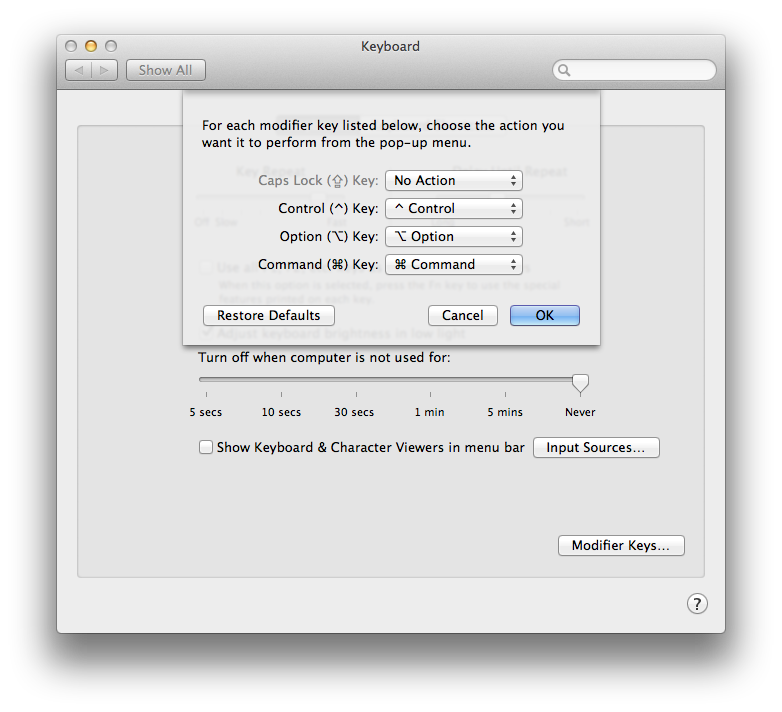
So how do you do it? On your Mac:
- Open ‘System Preferences’.
- Click on ‘Keyboard’.
- Click on ‘Modifier Keys…’.
- Select the pull-down menu next to ‘Caps Lock Key’ and assign ‘No Action’.